Filter bar
Use the Filter bar to display and configure the currently set filters of your analysis.
The set ad hoc filters affect all displayed analyses. You can select any number of dimension and measure filters for your analyses in the Filter bar and display the frequency for each set dimension.
The dimensions and measures available to you as filters depend on your process and data access privileges.
You can set the following filter criteria.
Text dimensions (n-level)
Time dimensions
Numerical dimensions (including distributable measures, that is, divisible into step widths)
Function and reference dimensions (if they are text dimensions or time dimensions)
Different display types are available depending on the type of filter criterion:
List view and tree view (text dimension)
Slider and calendar view (time dimension)
Slider view and compact view (numerical dimension)
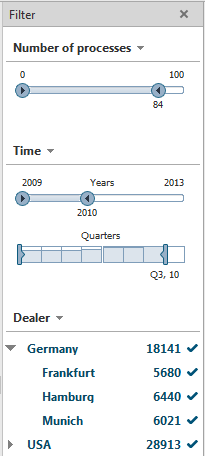
When you display a favorite for which filters are already set, these are displayed in the Filter bar.
When you set a filter using the Settings bar, the settings in the Filter bar are only adopted automatically if the same filter criterion is used here as on the Settings bar. Filters set in the Filter bar are automatically transferred to the Settings bar.
The Filter bar is available in all analysis realms and modules.